💞 Exchange favorites
Discover how to use Clemz on Vinted to exchange favorites and encourage the Vinted algorithm to promote your listings
Discover how to use Clemz on Vinted to exchange favorites and encourage the Vinted algorithm to promote your listings
Vinted's algorithm tends to promote recent listings that have a large number of favorites. This tells it that these listings are popular with buyers, so it will (among other things) display them in the "popular items" section of the news feed.
This effect has long been known to many Vinties who have formed "boost groups": groups of sellers on social media who exchange favorites in order to help each other and increase their sales. These groups are easy to find on Facebook or Instagram.
Ultimately, a recent listing that receives many favorites in the first few hours after it is created will be displayed more often (by the Vinted algorithm) on the profiles of potential buyers. This increases the visibility of your listings and therefore your chances of getting sales.
It's also important to remember that a listing with lots of favorites will indicate to a potential buyer that it is popular: this improves their image of the listing while suggesting that if they don't hurry up and buy it, someone else might do so before them!
The video below gives a quick overview of how to exchange favorites (and exchange views):
Clemz allows you to automatically receive favorites on your listings. How? By giving favorites to the community and receiving favorites in return. Here's how to get your favorites:
The first step is to install the Clemz extension on your web browser. If you haven't already done so, please go here to download the extension. Then go to the Vinted website to display the extension at the bottom left of your screen.
Now go to your closet page so that Clemz's "Exchange views & favorites" tab is accessible.

Clemz offers two settings for exchanging favorites:
ℹ️ How many favorites will I get with "random" mode? :
If you have requested up to X favorites, Clemz will give you between 0 and 9 fewer, at random.
Unless you request 5 or 10 favorites: Clemz will then give you between 0 and 4 fewer.
Example 1: if you request 30 favorites, you will receive between 21 and 30 per listing.
Example 2: if you request 5 favorites, you will receive between 1 and 5 per listing.
Example 3: if you request 10 favorites, you will receive between 6 and 10 per listing.
Now click on the "💞 Give and receive favorites" button. Clemz will then start automatically distributing favorites on your behalf. Once this distribution is complete, it will save your favorite request and forward it to the next people who distribute favorites.
For each request, you will receive between 10 and 40 favorites per item (depending on your current subscription) from other Vinties. They will browse your closet and gradually add favorites to all your listings, up to a maximum of 50 items.
Please refer to the section "Rules for exchanging favorites on Clemz" to understand how Clemz handles these exchanges.
💡 Tip: If you want favorites on your relisted items, submit your request for favorites immediately after relisting them. This ensures that Vinties don’t start browsing your closet before your listings are ready.
The number of visits by Vinties (via Clemz's exchange) giving you favorites can be tracked under the "Recent requests" indicator. This indicator gives you an idea of the number of favorites already distributed in your closet based on the total number expected.
Examples of displays under "Recent request:"
To enable its users to receive favorites, Clemz has an automated favorite exchange system. Here are the main rules governing how it works:
⚠️ Important points to keep in mind: when Clemz adds favorites on your behalf, this can have a significant impact on how your closet works. Indeed:
When you exchange favorites on Clemz, you have to give a large number of favorites to unknown listings. As a result, you can quickly become overwhelmed with unnecessary notifications about these listings: "it has been sold", "its price has dropped", etc.
These notifications will always be sent to your Vinted account: this cannot be changed. However, Vinted allows you to easily turn off mobile and email notifications. 💡 Please note that if you use Clemz's "Messages to favorites" feature, you no longer need to search through your notifications to find the favorites you have received on your listings. Clemz does it for you!
Here's how to turn off mobile and email notifications:


Sometimes, we want to help a friend by favoriting favorites in their closet. Clemz can help you speed up this process!
Simply go to your friend's closet page and Clemz will display the " Add to favorites" tab.
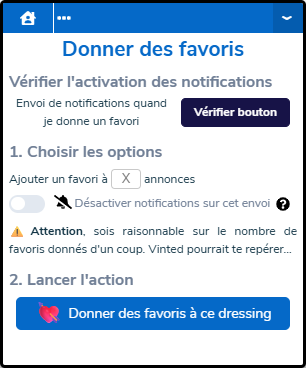
From there, choose the number of favorites to send and whether or not you want your friend to receive a notification. By clicking on the "💘 Add favorites to this closet" button, Clemz will add items from the closet to your favorites in a matter of seconds.
Is something unclear?