Why use automated offers?
When a Vintie makes you an offer on one of your items, it means they’re ready to buy. Unfortunately, if you don’t reply quickly, they’ll look elsewhere.
What’s more, every Vinted seller has had that frustrating experience of haggling with stingy buyers who bump up their offer by a single euro at a time: why get annoyed with them when Clemz can take over?
With Clemz’s automated offers, you can:
-
Automatically accept offers that meet your minimum price
-
Negotiate automatically by sending progressive counteroffers when the proposed price is too low
-
Respond in seconds, even when you’re not in front of your screen
The result: you sell faster, you never miss out on offers, and the negotiation takes care of itself.
How do Clemz’s “automatic offers” work?
The "automatic offers" feature allows Clemz to monitor the offers you receive and respond to them automatically based on the settings you have defined: maximum discount, number of counteroffers, personalised messages, etc.
Clemz will scan your inbox and then browse your recent conversations (going back up to 7 days, or whatever timeframe you’ve set) to identify any offers received that it can respond to. It will then decide to:
- either approve the acceptable offers,
- or make a counteroffer,
- or ignore the conversation.
Messages will then be collected at regular intervals : if Clemz detects a new offer or a response to one of its counteroffers, it reacts automatically.
This feature can be run alongside messages to favorites. Clemz will then intelligently switch between the two to minimise response times for both favorites and messages.
Clemz’s decision-making rules:
When it detects an offer in your conversations, Clemz follows the rules below:
-
Is the offer equal to or higher than your minimum price? → Clemz accepts the offer and sends one of your “acceptance messages”. (Note: if the offer is below the minimum price but the difference is less than the “tolerance” setting, Clemz accepts the offer rather than making a counteroffer for a few pence).
-
Is the offer too low but there are still counteroffers available? → Clemz sends a progressive counteroffer: it lowers the price in regular increments, from your listed price down to your minimum price, accompanied by one of your "counteroffer messages".
-
Is this the last possible counteroffer? → Clemz sends a final offer directly at your minimum acceptable price, accompanied by one of your “final offer messages”.
-
Does the buyer lower their offer or repeat it after a counteroffer? → Clemz considers that the buyer is not negotiating seriously and ignores the conversation.
How Clemz calculates counteroffers:
That’s probably the question you’re asking yourself. Here’s how it works:
- Clemz calculates your minimum acceptable price based on the price listed on Vinted and the maximum discount you’ve set. For example, an item priced at €60 with a maximum discount of 20% results in a minimum price of €48.
- Depending on the maximum number of counteroffers you set, Clemz calculates negotiation steps that are spaced out at regular intervals but not entirely equal (to avoid being too predictable).
- The final counteroffer is always sent directly at the minimum acceptable price, with a dedicated final offer message.
- If the rounding or "tolerance" you have configured requires it, Clemz may move directly to the final offer if the next calculated step is too close to it.
Practical example: you’re selling an item for €60 with a maximum discount of 20% and a maximum of 3 counteroffers.
- Minimum acceptable price: €48
- A Vintie offers you €35 → Clemz makes a counteroffer of ≈ €55.5
- She raises her offer to €40 → Clemz presents a counteroffer ≈ €51.2
- She offers €45 → Clemz presents a counteroffer of €48 (final offer, his minimum price) and sends a final offer message
- If she had offered €49 at any point during the negotiation (above the minimum) → Clemz would have accepted immediately
- If she had offered €47.70 (30 cents below the minimum of €48) and your tolerance is €0.50 → Clemz would have accepted, as the difference is less than the tolerance.
The prizes:
If a buyer makes an offer on a lot for which you’ve activated the bulk discount on Vinted, Clemz takes this into account. The maximum discount is calculated on the total price before the bulk discount, so the bulk discount is part of the overall discount. This prevents you from accumulating two discounts and selling below your actual minimum price.
Follow Clemz’s progress:
There are several ways you can track what Clemz is doing with automatic offers:
-
Your Vinted inbox shows you all the counteroffers and acceptances sent (click here).
-
Your Clemz Dashboard gives you a summary of actions taken (activity log) and lets you check if monitoring is in progress (here).
Offers: Step-by-step guide + option details
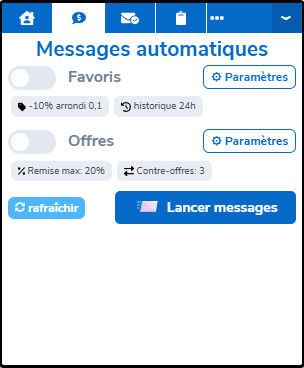
The Clemz tab for sending automatic offers can be accessed by going to the "Messaging" page on Vinted.
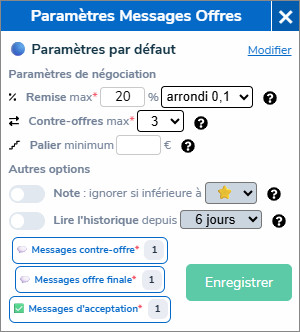
The ⚙ Settings button allows you to configure the options for this feature. You can also go via the Clemz Dashboard:
Setup by closet
If you have multiple closets, Clemz applies the same settings to all of them by default. But you can also create a specific configuration for each closet: different messages, different discounts, different options, etc.
On the Clemz Dashboard, select a closet from the drop-down menu to see whether it is using the default configuration or a customised one. The Clemz extension, meanwhile, shows you the active configuration with a colour indicator: 🔵 default, 🟣 customised.
1. Negotiation settings (mandatory)
These are the settings that determine how Clemz will negotiate on your behalf:
-
Discount method: defines how Clemz calculates the minimum acceptable price for each item or lot.
-
Flat discount: a fixed percentage discount applied to all your items. For example, 20% means that Clemz will never agree to sell below 80% of the listed price.
-
Tiered: different discounts depending on the item’s price or the number of items in a bundle. For example: 10% for items priced between €1 and €30, 15% for €30 to €80, and 20% for over €80. Each tier can be a percentage or a fixed amount in euros. Tiers are configured on the Clemz Dashboard.
👕Minimum price per item
You can set a minimum selling price per item so that
Clemz never offers a lower offer for that specific item (even within a lot).
To do this, go to your
item listing and edit the “minimum price” column. If no minimum price is set for an item, the configured discount is applied.
-
Rounding: rounding applied to the calculated minimum price and counteroffers. “Rounding 1” rounds to the nearest euro, “Rounding 0.1” to the nearest tenth. By default, no rounding is applied.
-
Maximum counteroffers: the number of counteroffers Clemz will send before moving on to the final offer (at the minimum price).
For example, with 3 counteroffers, Clemz will gradually lower the price in 3 stages and then send its lowest price as the final offer.
-
Tolerance (optional): the amount below which a price difference is not significant. Two effects: (1) the difference between two counteroffers will never be less than this amount; (2) if the buyer’s offer is below your minimum price but the difference is less than this tolerance, Clemz accepts the offer instead of counter-offering for a few pence.
2. Set up message texts (mandatory)
Clemz sends a message to accompany each action. You need to set up 3 message categories from your Clemz Dashboard:
-
Counteroffer messages: sent with each intermediate counteroffer. Examples: “I’m offering an intermediate price – what do you think?”, “I’m making an effort on the price 🤝”.
-
Final offer messages: sent with the last counteroffer at the minimum price. Examples: "Here’s my best price, this is my final offer!", "Can’t go any lower 😊".
-
Acceptance messages: sent when Clemz accepts the offer. Examples: "It’s accepted! I can dispatch it quickly 🎉", "That price suits me 😊".
For each category, you can enter up to 10 templates. Clemz ensures it doesn’t send the same message within the same negotiation conversation, making exchanges feel more natural.
3. Other options
These options allow you to fine-tune Clemz’s behaviour:
-
Ignore if rating is below x⭐: do not respond to offers from poorly rated Vinties. Vinties with no rating (new accounts) will also be ignored if you enable this option.
-
Respond only to offers received within the last x hours: ignore offers that are too old. For example, if you set this to “12 hours”, Clemz will not respond to offers older than 12 hours during its first scan. More recent offers and new offers received continuously will be processed as normal.
4. Launch automatic offers
Automatic offers are ready to be launched: simply tick the "Offers" box in the Clemz tab and start the process.
Once launched, Clemz scans your conversations, responds to eligible offers, and negotiates on your behalf. In the meantime, you can sleep, have a coffee, play a game of squash or make bread sticks for your soft-boiled eggs 🦾
How do Clemz’s “AI answers” work?
🚧Coming soon...🚧
Is something unclear?
Ask for clarification