♻️ Relist listings
Relisting your Vinted listings with Clemz increases traffic to your closet and therefore boosts your sales 🚀
Relisting your Vinted listings with Clemz increases traffic to your closet and therefore boosts your sales 🚀
The Vinted algorithm favours recently created listings by displaying them first in search results and in the home feed/news feed of each Vinted user.
Relisting a listing involves creating a new listing by copying the information from an old listing exactly (same photos, title, description, etc.) and then deleting the old listing to avoid a duplicate.
By relisting a listing that is a few weeks old, you increase your chances of it being seen by a potential buyer. This is simply because the listing will appear first in their search results and news feed.
In addition, visitors who click on your relisted listings will usually browse the rest of your closet. All of this makes relisting a very common practice among experienced Vinted sellers.
But relisting should not be done haphazardly! First of all, because there are tips for optimising the impact of your relists. But also because Vinted's algorithm is watching! It doesn't let people relist haphazardly...
The video below gives a quick overview of relist and how it works:
Now that you know you need to relist your listings, you may have lots of questions: how often should you relist? When? Will Vinted prevent you from relisting whenever you want?
Here are the three rules I suggest you follow:
Vinted's algorithm penalises the relisting of listings that have been on Vinted for less than a few months: the new listing created will have less visibility or none at all.
In the end, you will have done all this for nothing because your listing will not have gained any visibility...
Worse still, if you accidentally publish a listing that is identical to an existing one, Vinted may restrict your account for several days or even ban it!
Fortunately, there is a solution: Clemz! With Clemz, you can relist a listing as often as you like , provided you use the "edit my photos" option. This way, Vinted will not recognise the relisted listing and it will be considered new, even 1 week or 1 day after its creation.
Clemz allows you to relist each listing in a matter of seconds, without errors and, most importantly, without triggering the Vinted algorithm that limits relists to once every six months for each listing!
To use it, you need to have the Clemz extension installed on your browser (Chrome, Quetta or Orion). If you haven’t done so yet, read the quick start item.
The video below explains, visually, how to relist with the Clemz extension from your browser:
Step 1: add listings to the "to be processed" list

Step 2: enter the options
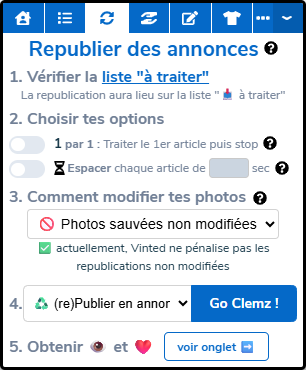
Step 3: Choose how to edit your photos
Clemz will use your saved photos and modify them itself. This will change the appearance of the photos in your listings by adding a frame, an emoji, text, changing the background, etc. This is ideal for ensuring that Vinted does not identify your relists.
Also, by starting with an original photo each time you do a relist, your photos will not deteriorate with each relist (Vinted compresses them each time).
By clicking on Photo Editing, Clemz offers you numerous editing options to more easily fool Vinted and make your photos look new: read here how to edit your photos properly.
Step 4: Start relisting
Now just let Clemz do its work. Remember to check your closet once Clemz has finished.
Clemz offers various options for your relists:
Clemz offers two types of relists:
➡️ Please click here ⬅️ I have written a comprehensive guide that explains everything in detail: how to let Clemz edit your photos, what editing options are available, etc.
Sometimes Vinted blocks your relists by asking for a captcha to verify that you are not a robot.

Here are a few tips to stop being harassed by Vinted captchas:
When a captcha blocks Clemz, it will display it directly to you and you simply need to solve it for Clemz to continue its work. Vinted will then remember (via your cookies) that your browser is controlled by a human, not a robot => Clemz should no longer be blocked again.
If Vinted ever blocks your browsing with a message, don't panic: it's only temporary! Clear your Chrome cookies or switch to private browsing to unblock yourself.
If necessary, you can also trigger a captcha to prove that you are human:
It is important to remember that Vinted is unfortunately not an exact science... Sometimes there are periods of intense sales and sometimes there are slow periods.
Many factors influence sales. Some you can control (item type, price, photo quality, visibility of your listings, etc.) and others that are beyond the control of all Vinties (traffic on Vinted, algorithm choices, luck in finding the right customer, etc.).
Clemz cannot guarantee 100% of purchases. The only certainty is that by relisting, you will sell as much or more than if you did nothing. It seems obvious, but it is important to remember: you will never sell less by increasing the visibility of your closet.
If you're experiencing a slow period, don't jump to conclusions based on a few days or 1-2 weeks: you need to look at the long term. Persevere for a while and after a month of regular relists, you should see a clearer picture.
And above all, remember to follow the relisting advice I give here.
If an item appears in your Clemz to-do lists with the 🌓 icon, it means the item is incomplete. This means that Clemz has not managed to retrieve 100% of the item’s details: it has the photos and most of the fields (e.g. price, description, title) but some are missing (e.g. size, parcel size, measurements, etc.).
This just means that the information in the list is incomplete, not the Vinted listing itself. Why? This is a restriction that Clemz encounters on two types of listings:
Incomplete listings in your list to be processed may:
However, it is impossible to modify them or to relist them without importing them from clemz.app. This is because Clemz does not have all the information necessary to perform these actions.
For more information, visit the Vint-aide forum or watch this video on the Clemz YouTube channel:
Is something unclear?